
You can now use Geforce Now on your Linux machine with this quick little trick.
Install User Agent Switcher Extension
Install the User Agent Switcher extension for any Chromium-based browser. I used this on Brave and it worked perfectly.
Install this Extension and launch options!
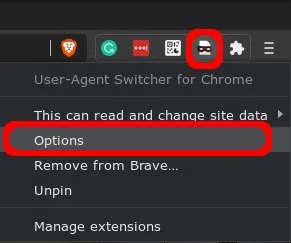
Add Chrome OS User Agent
Add the User Agent String:
Mozilla/5.0 (X11; CrOS x86_64 13099.85.0) AppleWebKit/537.36 (KHTML, like Gecko) Chrome/84.0.4147.110 Safari/537.36
Switch Agent and Launch
- Click on the Extension icon and select COS or whatever flag you made.
- Then Launch https://play.geforcenow.com/



Comments
Comments load when this section comes into view.